How to add a line to your AT&T Wireless phone plan
How to add a line to your AT&T Wireless phone plan
Learn how to add a line to your AT&T phone plan, including costs, benefits, and deals.
Adding an extra line to your AT&T account is an easy and cost-effective way to allow another person to be part of your wireless plan. You can add a family member, friend, or other users, who can then use the plan’s services. Did you know adding a line can even help you save money? AT&T plans may offer multi-line discounts when you add multiple lines so it’s a win-win for everyone on your plan.
If you’re thinking “When would I need to add a line to my phone plan”, this video shows you just some of our favorite examples of when to add a line to your AT&T account:
Add a new line to your plan
Whether it’s friends or family, it’s always good to stay connected.
- Flexible pricing with AT&T Unlimited Your Way®
- Free shipping and flexible returns
- Same-day pick-up at your local AT&T store
- Get free next-day shipping for all new lines of service
How much does AT&T charge for one additional line?
How much does it cost to add a line to AT&T? In short, adding a new line can cost as low as $25 per line, depending on the plan and features you select. When adding a line, customers may also be eligible for deals like free phones, bill credits, and multi-line discounts.

How many lines can I add to my AT&T plan?
You can have up to ten lines total and save $10 per month on every line when you sign up for both eligible AutoPay and paperless billing with your debit card or bank account.
AT&T lets you choose an unlimited plan to fit each person on your account. You can mix & match from our best unlimited data plans: AT&T Value 2.0SM, AT&T Extra 2.0SM, and AT&T Premium 2.0SM.
In general, adding a new voice line can cost as low as $30 per line when you have more than four lines. The price per line tends to go down as you add more lines. You can even add wearables like smartwatches for as little as $10 a month as additional lines on your account. More lines equals more savings.
Does AT&T have add-a-line deals?
Adding a line to your AT&T account is an easy and cost effective way to allow another person to be part of your wireless plan. You can add a family member, friend, or other user, and enjoy AT&T’s multi-line discounts. That’s a win-win for everyone on your account. Check out the latest deals and discounts when you add a line to your account
Plus, with SplitPay, getting paid by line-level users is easy. Learn more about SplitPay
Can I add another phone to my AT&T plan?
You can have up to ten devices on one AT&T wireless plan. With each line, you can buy a new cell phone or bring your own device.
If you bring your own phone, you’ll score some special deals too!
You can even keep your same number. If your device is currently active with another carrier, you can see if you can keep your same number when you switch to AT&T.
What types of unlimited wireless plans does AT&T offer?
Our best unlimited plans come with high-speed data, 5G access1, ActiveArmor® security, hotspot data2, and more.
AT&T Value 2.0SM includes:
-
Unlimited talk, text and data in and between the U.S., Canada and Mexico3
-
AT&T 5G access1
-
ActiveArmor security1
-
5GB of high-speed data and 3GB2 of hotspot data (After 5GB, AT&T may temporarily slow data speeds if the network is busy.)
AT&T Extra 2.0SM includes:
-
Everything in AT&T Value 2.0, with 100GB of high-speed data
-
50GB2 of hotspot data
-
Your choice of our best smartphone deals1 (After 100GB, AT&T may temporarily slow data speeds if the network is busy.)
AT&T Premium 2.0SM includes:
-
Unlimited high-speed data that can’t slow down based on how much you use
-
100GB2 of hotspot data
-
Unlimited talk, text and high-speed data in 20 Latin American4 countries at no extra cost
1Compatible device for 5G and AT&T ActiveArmor app access. Download of app req’d. Some mobile security features are not avail. while roaming internationally. 5G coverage not available everywhere. Learn more at att.com/5Gforyou.
2After 3GB/50GB/100GB/250GB, speeds slowed to max 128kbps.
3Unlimited talk, text & data in and between the U.S., Canada & Mexico: 2G off-net data speeds may apply.
4Unlimited talk, text & high-speed data in 20 Latin American countries: Coverage and data speeds vary. Int’l usage should not exceed Domestic.
5Req’s compatible plan & device. Coverage not available everywhere. Visit att.com/turbo to learn more.
6After 20GB of Int’l data, speeds may be reduced to a max of 512Kbps.
Want to add a line to an AT&T Prepaid plan?
With AT&T Prepaid plans, everyone gets their own line, their own plan, and their own data.
Save up to $20 monthly on every line when you add up to five lines in one convenient monthly payment through AutoPay. Check out the AT&T Prepaid plans

Steps to add a line to your existing AT&T mobile plan
Ready to add a line to your AT&T account? Follow these steps:
Step 1: Visit ATT.com and sign in to your account
Step 2: Select the Add a device option
Step 3: Decide if you’ll be connecting your own phone, or buying a new one from AT&T
Step 4: Pick the plan and features for your new line
Step 5: Set up and activate the new line on your AT&T wireless plan
Step 6: If you purchased a new device, you can usually pick it up in-store the same day, or choose if you want to have it delivered
Helpful tips

Don’t forget to enroll in AutoPay to get your monthly discount

Consider adding protection against damage or loss to keep your devices safe
Pro tip
Don’t forget to add protection against damage or loss.
(Luckily, you can pick which lines have a little extra protection—great news for those of us who’re a little on the clumsy side).

Tips for monitoring data usage across multiple lines on one AT&T account
You can monitor your wireless data usage for every line on your AT&T wireless account. There’re several methods to choose from:
- For a quick summary of data usage for the current month, call *DATA (*3282) from your AT&T wireless phone. You’ll get a free text message with your estimated remaining data usage and remaining balance.
- To dive deeper and view more details, sign in to your wireless AT&T account from your computer or the myAT&T app on your phone.
- If you don’t yet have the app, get it for free by texting the word myATT to 556699 from your wireless device to manage features and see the data usage summary—including a breakdown of data usage by each device on your account.
Learn more in this AT&T support article.
Conclusion
Adding a new line to your AT&T wireless plan is an easy, cost-effective, and convenient way to get the people who matter most in your life on the same wireless account. Same bill, one payment, multi-line discounts—there are plenty of reasons to add a line.
If you’re ready to add a line to your AT&T account, get started.
More articles and information

AT&T cell phone and data-only plans
Learn more about our wireless phone plans and data plans. Compare pricing and features and find the best plan to fit your needs.
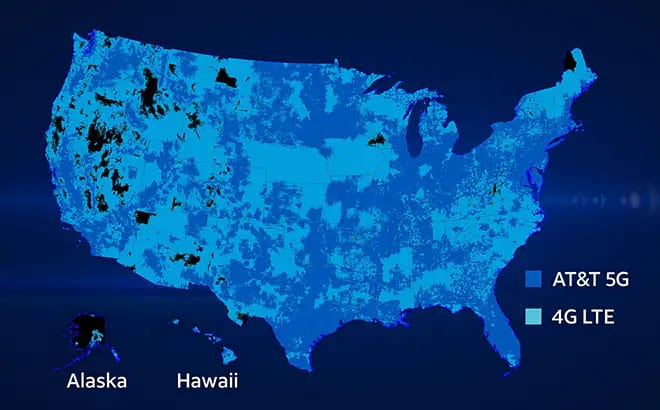
AT&T 5G network & coverage maps
Learn how to connect to our 5G network, which wireless plans include 5G access, and how to upgrade to a 5G-capable phone.

Get our best deals and discounts
Discover how to get discounts, savings, and benefits through your employer, organization, or school.