Wireless Power Sharing
Wireless Power Sharing
Learn how to use Wireless Power Sharing.
INSTRUCTIONS & INFO
In this tutorial, you will learn how to:
• Access/turn on or off Power Sharing
• Set battery limit
Access/turn on or off Power Sharing
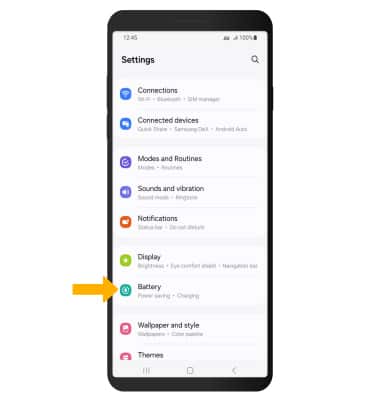
1. Swipe down from the upper right corner of the screen, then select the  Settings icon.
2. Select Battery.
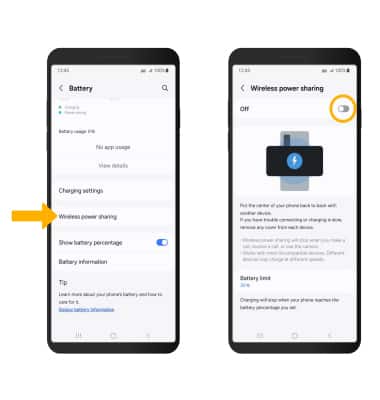
3. Scroll to and select Wireless power sharing, then select the Wireless power sharing switch to enable.
Set battery limit
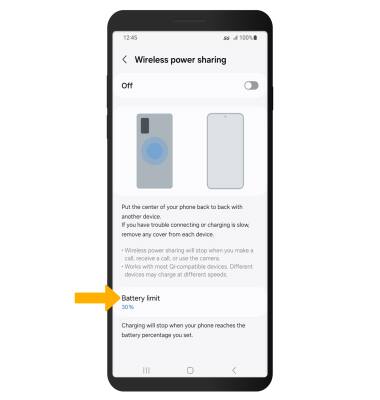
1. Wireless power charging will stop when your phone reaches the battery percentage limit you set. To set a battery limit, from the Wireless Power sharing screen, select Battery limit.
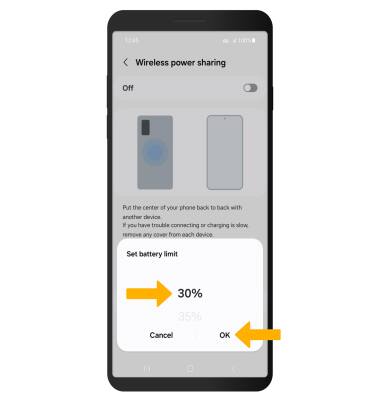
2. Select the desired battery limit, then select OK.