Messaging Settings
Messaging Settings
Change text (SMS), picture (MMS), emergency, and AMBER alert settings
INSTRUCTIONS & INFO
In this tutorial, you will learn how to:
• Access Messages app Settings
• Adjust Notifications
• Manage emergency alerts
Messages settings allow you to control image size, message history, and more.
Access Messages app Settings
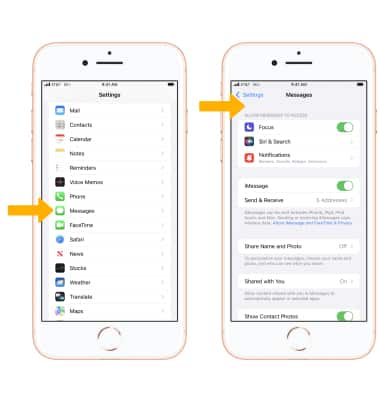
1. From the Home screen, select the  Settings app.
2. Scroll to and select Messages. Adjust message settings as desired.
Note: Available options vary when iMessage is turned off.
Adjust Notifications
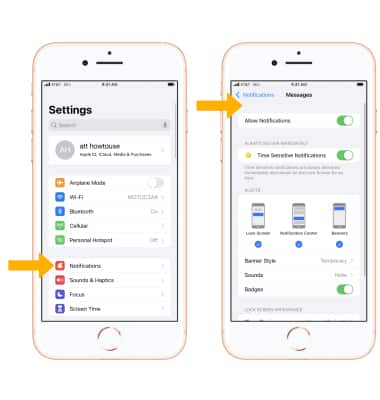
From the Settings screen, select Notifications > scroll to and select Messages > edit your Messages notifications as desired.
Note: Learn more from the Apple website: https://www.apple.com/ios/messages/.
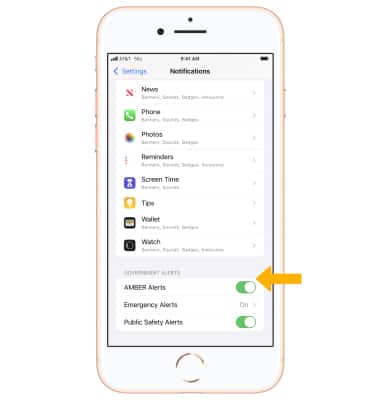
Manage emergency alerts
From the Notifications screen, scroll to and select the desired  Emergency alert switch under Government alerts to turn the desired alert on or off.
Note: Learn more about Wireless Emergency Alerts (WEA).