Advanced Photo & Video Features
Advanced Photo & Video Features
Learn how to access and use Camera modes, effects, customization, and crop a photo.
INSTRUCTIONS & INFO

To access the Camera app, from the home screen select the  Camera app. You can also swipe up from the Camera icon on the lock screen or by pressing the Volume down button twice.
Camera app. You can also swipe up from the Camera icon on the lock screen or by pressing the Volume down button twice.In this tutorial, you will learn how to:
• Access camera modes and filters
• Customize photo and video settings
• Switch between regluar, ultra zoom, and wide angle
• Crop a photo
This tutorial requires you to open the Camera app. From the home screen, select the Camera app. To access the camera from the lock screen, select and drag the Camera icon up or press the volume down button twice.
Access camera modes and filters
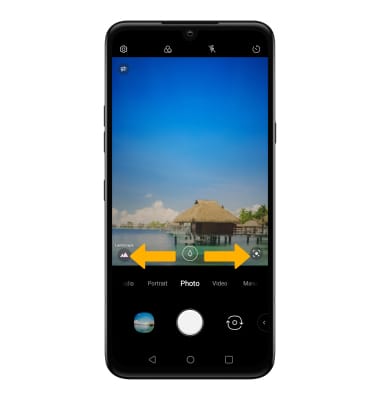
From the Camera app, swipe left or right to the desired camera mode.
Note: To access additional camera modes, swipe left to More then select the desired camera mode. For more information, please see the Camera Modes tutorial.
Note: To access additional camera modes, swipe left to More then select the desired camera mode. For more information, please see the Camera Modes tutorial.
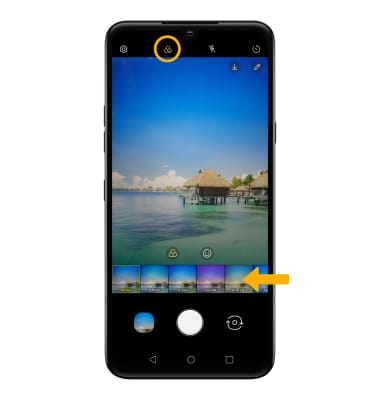
To access filters, select the Filters icon then select the desired filter.
Note: Filters are not available in some camera modes.
Customize photo and video settings
From the Camera app, select the  Settings icon then edit settings as desired.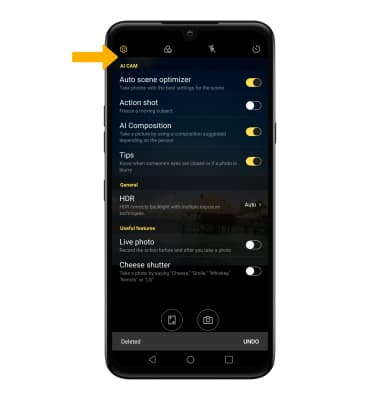
Switch between regluar, ultra zoom, and wide angle
From the camera screen, select or drag the zoom icon to switch between regular, ultra zoom, and wide angle.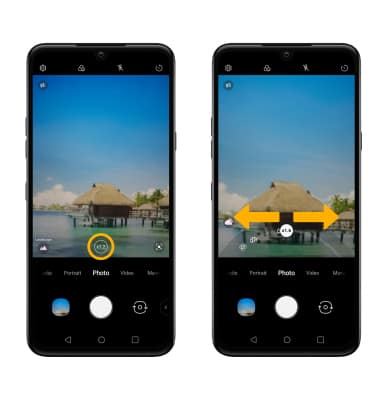
Crop a photo
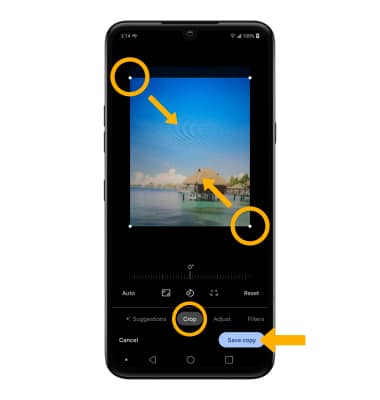
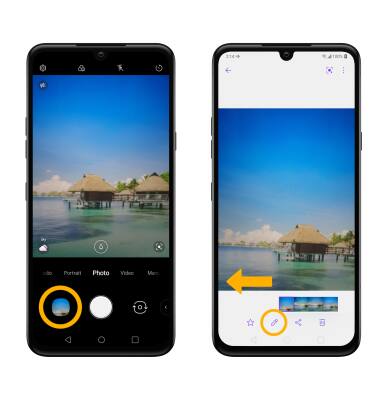
1. From the Camera app, select the Gallery icon. Swipe left to the desired photo, then select the Edit icon.
Note: Alternately, from the home screen select the Gallery app then navigate to and select the desired photo.
Note: Alternately, from the home screen select the
Gallery app then navigate to and select the desired photo.2. Select Crop. Select and drag the crop corners to crop as desired, then select Save copy.