Access Voicemail
Access Voicemail
Find out how to check your voicemail messages.
INSTRUCTIONS & INFO

To access voicemail, you must have already Set Up Voicemail. If you have forgotten your existing voicemail password, you will not be able to access voicemail until you reset your voicemail password. Go to Troubleshoot Voicemail for solutions to common voicemail problems.
In this tutorial, you will learn how to:
• Access voicemail
• Listen to a voicemail
Access voicemail
1. From the clock screen, press the Digital Crown/Home button then select the  Phone app.
2. Scroll to and select Voicemail. 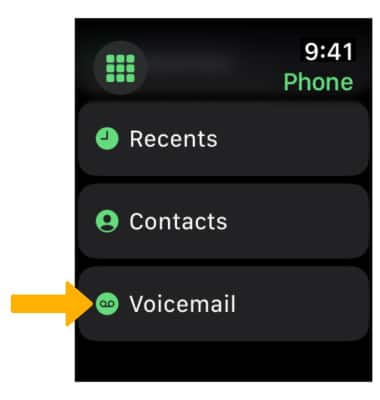
Listen to a voicemail
1. Select the desired message. 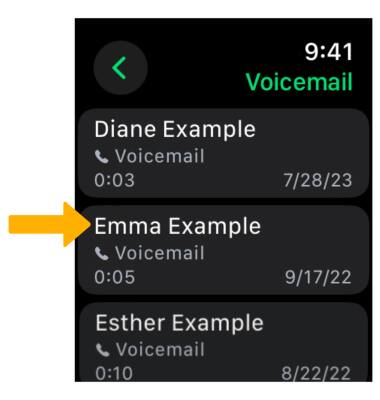
2. Select the  Play icon. Select the corresponding options: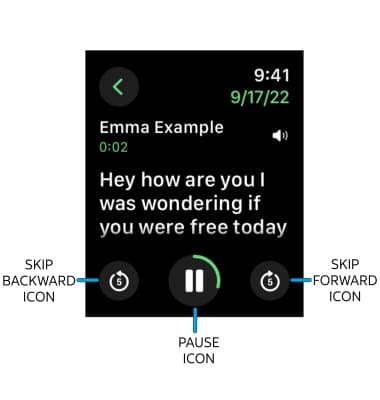
• SKIP: To skip forwards or backwards in 5 second increments, select the desired icon.
• PAUSE: Select the Pause icon.
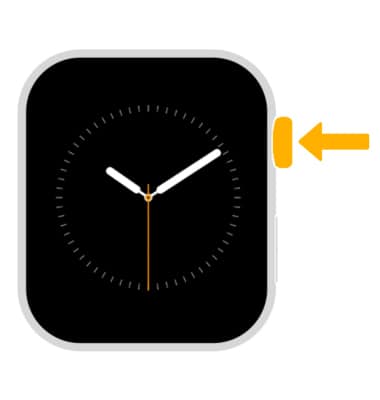
3. To adjust the volume, rotate the Digital Crown/ Home button to the desired volume.
4. While the message is paused, select the desired icons:
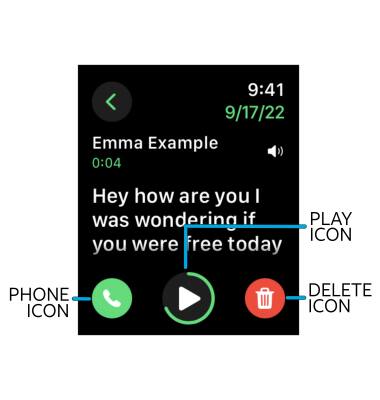
• PLAY: Select the Play icon.
• CALL BACK: Select the Phone icon.
• DELETE: Select the Delete icon.
• CALL BACK: Select the Phone icon.
• DELETE: Select the Delete icon.