Crash & Fall Detection
Crash & Fall Detection
Learn how to access and use Crash and Fall detection.
INSTRUCTIONS & INFO

Call for help when you need it most. Your device can detect severe car crashes and also whether you’ve had a fall. If you’re unresponsive, a call to emergency services will be placed automatically. This requires a cellular connection or Wi-Fi Calling with an internet connection from your Apple Watch or nearby iPhone.
In this tutorial, you will learn how to:
• Turn Crash Detection on or off
• Turn Fall Detection on or off
• Edit Fall Detection settings
Turn Crash Detection on or off
1. From the clock screen, press the Digital Crown/Home button then select the  Settings app.
Settings app.2. Scroll to and select SOS, then scroll to and select Call After Severe Crash.
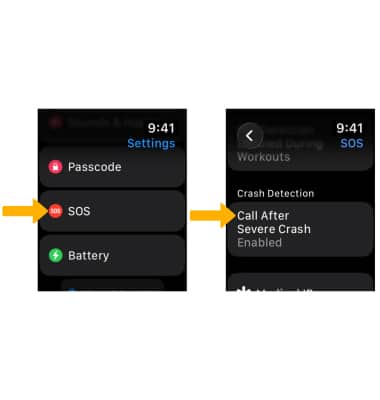
3. Select the  Call After Severe Crash switch to enable or disable.
Note: Crash detection is enable automatically. Apple Watch Ultra cannot detect all car crashes.
Call After Severe Crash switch to enable or disable. Note: Crash detection is enable automatically. Apple Watch Ultra cannot detect all car crashes.
Turn Fall Detection on or off
From the SOS screen, select Fall Detection then select the Fall Detection switch.
Note: Alternately, you can turn on Fall detection from your paired iPhone. To turn on or off, navigate to and select the  Watch app > Emergency SOS >
  Fall Detection switch.
Edit Fall Detection settings
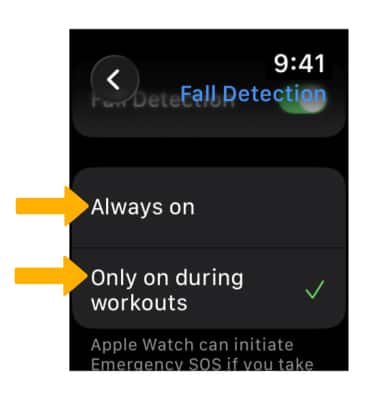
From the Fall Detection screen, select either Always on or Only on during workouts to have Fall Detection on only when you’ve started a workout.