Sounds
Change volume settings, ringtones, and notification alerts.
In this tutorial, you will learn how to:
• Access sound settings
• Adjust volume
• Enable silent mode
Access sound settings
To change sound settings, from the clock screen press the Digital Crown/Home button then select the  Settings app. Scroll to and select Sounds & Haptics.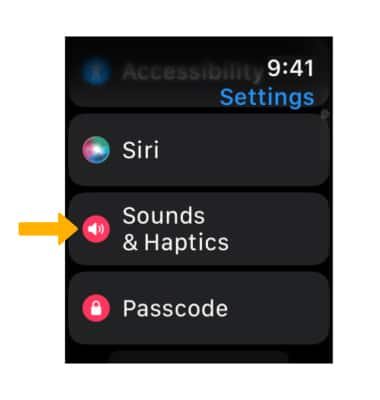
Adjust volume
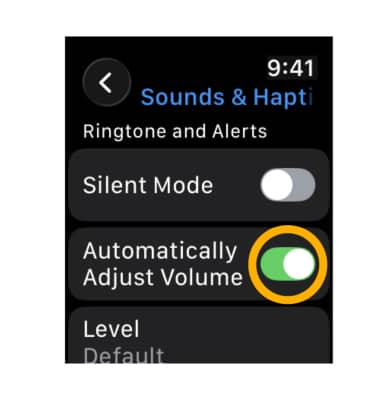
1. With iOS 26, Apple Watch can now automatically adjust the speaker volume based on the ambient noise in a user’s surroundings for notifications, timers, alarms, incoming calls, and Siri. To manually adjust the volume, select the Automatically Adjust Volume switch.
2. Select the desired Volume icon to increase or decrease the volume as desired. 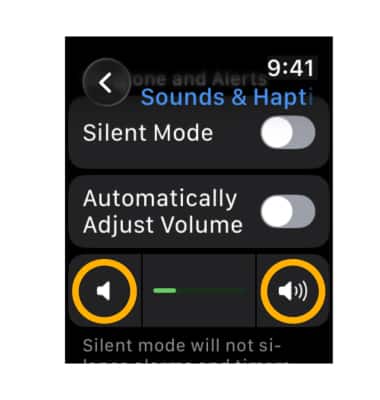
Enable silent mode
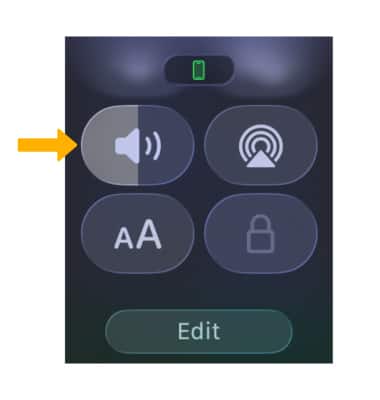
From the clock screen, press the Side button to access the Control Center. Scroll to and select the Sound icon to turn Silent Mode on or off.
Note: Alternately, from the Sounds & Haptics screen, select the  Silent Mode switch.